LOOPS
In general, statements are executed sequentially: The first statement in a function is executed first, followed by the second, and so on.
There may be a situation when you need to execute a block of code several number of times.
Looping statements:
These statements are used to perform a set of instructions repeatedly depending upon the defined condition.
Java programming language provides the following types of loop to handle looping requirements.
The ‘for’ and ‘while’ loop are called Entry-Controlled loops because condition is tested at entry point of loop i.e. loop is executed only if defined condition is true.
The ‘do’ loop is Exit-Controlled since condition is tested at exit point i.e. loop is executed at least single time even defined condition is false.
For loop: The syntax of the for loop is: for(initialization;testexpression;increment/decrementexpression)
{ statements; }
In for loop all the parameter like initialization, text condition or increment/decrement is optional.
A for loop is a repetition control structure that allows you to efficiently write a loop that needs to be executed a specific number of times.
A for loop is useful when you know how many times a task is to be repeated.
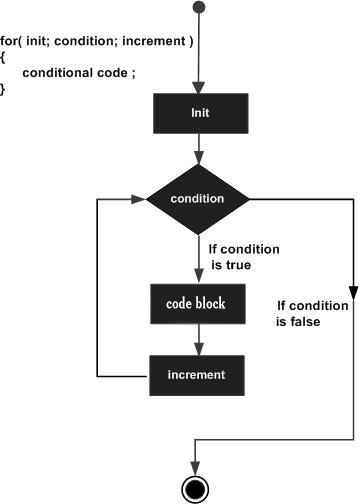
Here is the flow of control in a for loop −
The syntax of the while loop is as follows:
while(testexpression)
{ loopbody }
if the boolean_expression result is true, then the actions inside the loop will be executed. This will continue as long as the expression result is true.
When the condition becomes false, program control passes to the line immediately following the loop.
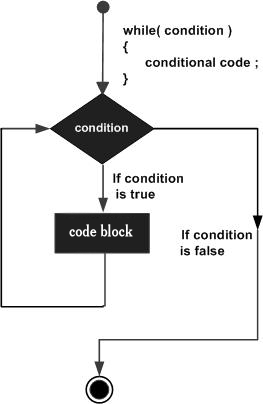
Here, key point of the while loop is that the loop might not ever run. When the expression is tested and the result is false, the loop body will be skipped and the first statement after the while loop will be executed.
Loop control statements change execution from its normal sequence. When execution leaves a scope, all automatic objects that were created in that scope are destroyed.
switch (day)
{ case 1 : jTextField1.setText(“One”); break;
case 2 : jTextField1.setText(“two”); break;
case 3 : jTextField1.setText(“three”); break;
default : jTextField1.setText(“Other”); }
//loop to generate first 10 numbers //
for (int i=1; i<=10 ; i++ )
{ jTextArea1.append (“ ”+i); }
//loop to find even nos. up to 50//
for (int i=0; i<=50 ; i=i+2)
{ jTextArea1.append (“ ”+i); }
//while loop to generate first 10 numbers
// int i=1; while (i<=10 )
{ jTextArea1.append (“ ”+i); i++; }
do while :
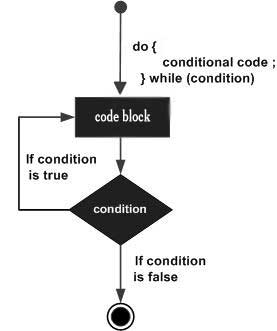
Do..While loop is an exit-controlled loop.
In the do..while loop, the test occurs at the end of the loop.
This ensures that the do..while loop executes the statements included in the loop body at least once.
The syntax of the loop is as follows
:
do
{ loopbody
}while(testexpression);
int i=1;
do
{ jTextArea1.append (“ ”+i); i++;
}while (i<=10 );
Notice that the Boolean expression appears at the end of the loop, so the statements in the loop execute once before the Boolean is tested.
If the Boolean expression is true, the control jumps back up to do statement, and the statements in the loop execute again. This process repeats until the Boolean expression is false.
Break and Continue statement:
Java offers three jump statements (return, break and continue), which transfers the control elsewhere unconditionally.
BREAK
It can be used to terminate a case in the switch statement
Syntax The syntax of a for loop is: for(initialization; Boolean_expression; update) { //Statements } Here is the flow of control in a for loop: The initialization step is executed first, and only once. This step allows you to declare and initialize any loop control variables and this step ends with a semi colon (;). Next, the Boolean expression is evaluated. If it is true, the body of the loop is executed. If it is false, the body of the loop will not be executed and control jumps to the next statement past the for loop. After the body of the for loop gets executed, the control jumps back up to the update statement. This statement allows you to update any loop control variables. This statement can be left blank with a semicolon at the end. The Boolean expression is now evaluated again. If it is true, the loop executes and the process repeats (body of loop, then update step, then Boolean expression). After the Boolean expression is false, the for loop terminates.
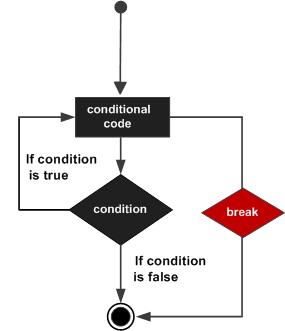
Break Statement in Java The break statement in Java programming language has the following two usages: When the break statement is encountered inside a loop, the loop is immediately terminated and the program control resumes at the next statement following the loop. It can be used to terminate a case in the switch statement
Continue Statement in Java The continue keyword can be used in any of the loop control structures. It causes the loop to immediately jump to the next iteration of the loop. In a for loop, the continue keyword causes control to immediately jump to the update statement. In a while loop or do/while loop, control immediately jumps to the Boolean expression.
In general, statements are executed sequentially: The first statement in a function is executed first, followed by the second, and so on.
There may be a situation when you need to execute a block of code several number of times.
Looping statements:
These statements are used to perform a set of instructions repeatedly depending upon the defined condition.
Java programming language provides the following types of loop to handle looping requirements.
The ‘for’ and ‘while’ loop are called Entry-Controlled loops because condition is tested at entry point of loop i.e. loop is executed only if defined condition is true.
The ‘do’ loop is Exit-Controlled since condition is tested at exit point i.e. loop is executed at least single time even defined condition is false.
For loop: The syntax of the for loop is: for(initialization;testexpression;increment/decrementexpression)
{ statements; }
In for loop all the parameter like initialization, text condition or increment/decrement is optional.
A for loop is a repetition control structure that allows you to efficiently write a loop that needs to be executed a specific number of times.
A for loop is useful when you know how many times a task is to be repeated.
Here is the flow of control in a for loop −
- The initialization step is executed first, and only once. This step allows you to declare and initialize any loop control variables and this step ends with a semi colon (;).
- Next, the Boolean expression is evaluated. If it is true, the body of the loop is executed. If it is false, the body of the loop will not be executed and control jumps to the next statement past the for loop.
- After the body of the for loop gets executed, the control jumps back up to the update statement. This statement allows you to update any loop control variables. This statement can be left blank with a semicolon at the end.
- The Boolean expression is now evaluated again. If it is true, the loop executes and the process repeats (body of loop, then update step, then Boolean expression). After the Boolean expression is false, the for loop terminates.
Flow Diagram
Example
Following is an example code of the for loop in Java.public class Test { for(int x = 10; x < 20; x = x + 1) { System.out.print("value of x : " + x ); System.out.print("\n"); }This will produce the following result −
Output
value of x : 10
value of x : 11
value of x : 12
value of x : 13
value of x : 14
value of x : 15
value of x : 16
value of x : 17
value of x : 18
value of x : 19
While loop : The while loop is an entry-controlled loop. It means that the loop condition is tested before executing the loop body.
The syntax of the while loop is as follows:
while(testexpression)
{ loopbody }
if the boolean_expression result is true, then the actions inside the loop will be executed. This will continue as long as the expression result is true.
When the condition becomes false, program control passes to the line immediately following the loop.
Flow Diagram
Here, key point of the while loop is that the loop might not ever run. When the expression is tested and the result is false, the loop body will be skipped and the first statement after the while loop will be executed.
Loop control statements change execution from its normal sequence. When execution leaves a scope, all automatic objects that were created in that scope are destroyed.
switch (day)
{ case 1 : jTextField1.setText(“One”); break;
case 2 : jTextField1.setText(“two”); break;
case 3 : jTextField1.setText(“three”); break;
default : jTextField1.setText(“Other”); }
//loop to generate first 10 numbers //
for (int i=1; i<=10 ; i++ )
{ jTextArea1.append (“ ”+i); }
//loop to find even nos. up to 50//
for (int i=0; i<=50 ; i=i+2)
{ jTextArea1.append (“ ”+i); }
//while loop to generate first 10 numbers
// int i=1; while (i<=10 )
{ jTextArea1.append (“ ”+i); i++; }
do while :
Do..While loop is an exit-controlled loop.
In the do..while loop, the test occurs at the end of the loop.
This ensures that the do..while loop executes the statements included in the loop body at least once.
The syntax of the loop is as follows
:
do
{ loopbody
}while(testexpression);
int i=1;
do
{ jTextArea1.append (“ ”+i); i++;
}while (i<=10 );
Notice that the Boolean expression appears at the end of the loop, so the statements in the loop execute once before the Boolean is tested.
If the Boolean expression is true, the control jumps back up to do statement, and the statements in the loop execute again. This process repeats until the Boolean expression is false.
Flow Diagram
Example
public class Test {

   public static void main(String args[]) {
      int x = 10;

      do {
         System.out.print("value of x : " + x );
         x++;
         System.out.print("\n");
      }while( x < 20 );
   }
This will produce the following result −
Output
value of x : 10 value of x : 11 value of x : 12 value of x : 13 value of x : 14 value of x : 15 value of x : 16 value of x : 17 value of x : 18 value of x : 19
Break and Continue statement:
Java offers three jump statements (return, break and continue), which transfers the control elsewhere unconditionally.
BREAK
- The break is used with for.., while, do.. and switch statements which transfers control just after the nearest closing of block by skip over some part of the code.
- It is also used to terminate the loop.
It can be used to terminate a case in the switch statement
Syntax
The syntax of a break is a single statement inside any loop −break;
Flow Diagram
for(int x=1;x<=10;x++ ) {
         if( x%5==0 ) {
            break;
         }
         System.out.print( x );
         System.out.print("\n");
      }
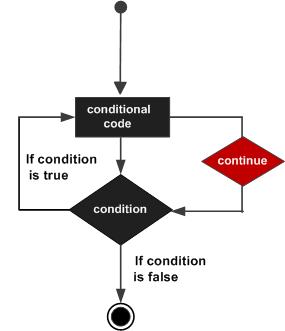
The continue statement is used within looping statement (not with switch) and works like break i.e. it also skips the statements. Unlike break, it forces the next iteration of loop by skipping the in between code and continues the loop.
- In a for loop, the continue keyword causes control to immediately jump to the update statement.
- In a while loop or do/while loop, control immediately jumps to the Boolean expression.
Syntax
The syntax of a continue is a single statement inside any loop −
continue;
Flow Diagram
for(int x=1;x<=10;x++ )  {
         if( x%5 == 0 ) {
            continue;
         }
         System.out.print( x );
         System.out.print("\n");
      }
Syntax The syntax of a for loop is: for(initialization; Boolean_expression; update) { //Statements } Here is the flow of control in a for loop: The initialization step is executed first, and only once. This step allows you to declare and initialize any loop control variables and this step ends with a semi colon (;). Next, the Boolean expression is evaluated. If it is true, the body of the loop is executed. If it is false, the body of the loop will not be executed and control jumps to the next statement past the for loop. After the body of the for loop gets executed, the control jumps back up to the update statement. This statement allows you to update any loop control variables. This statement can be left blank with a semicolon at the end. The Boolean expression is now evaluated again. If it is true, the loop executes and the process repeats (body of loop, then update step, then Boolean expression). After the Boolean expression is false, the for loop terminates.
Break Statement in Java The break statement in Java programming language has the following two usages: When the break statement is encountered inside a loop, the loop is immediately terminated and the program control resumes at the next statement following the loop. It can be used to terminate a case in the switch statement
Continue Statement in Java The continue keyword can be used in any of the loop control structures. It causes the loop to immediately jump to the next iteration of the loop. In a for loop, the continue keyword causes control to immediately jump to the update statement. In a while loop or do/while loop, control immediately jumps to the Boolean expression.

Good Post! Thank you so much for sharing this pretty post, it was so good to read and useful to improve my knowledge as updated one, keep blogging
ReplyDeleteDot Net Training In Chennai | Dot Net Training Institute In Chennai | Dot Net Course In Chennai
Software Testing Training Chennai | Software Testing Course In Chennai | Testing Courses In Chennai
Java Training Institute in Chennai | Core Java Training in Chennai | Java Course and Certification
PHP Course in Chennai | PHP Training Institute in Chennai | PHP Course and Certification